nvidia_gpu_exporter
Nvidia GPU exporter for Prometheus, using the nvidia-smi binary to gather metrics. Runs on Linux, Windows and macOS, on bare metal, in Docker or on Kubernetes.
Warning
Heads up: this is a side project I maintain in my spare time. I might take a long time to look at issues or PRs, or not get to them at all. Sorry in advance, and thanks for understanding.
Introduction
This is a simple exporter that uses the nvidia-smi(.exe) binary to collect, parse and export metrics. Since it only needs nvidia-smi, it also works on Windows - no Docker or Linux required.
It can also skip nvidia-smi entirely and read the metrics straight from the driver library. See the NVML backend below.
Quick start
On a Linux machine with the NVIDIA driver and the NVIDIA Container Toolkit:
docker run -d --name nvidia_gpu_exporter --restart unless-stopped \
  --gpus all -e NVIDIA_DRIVER_CAPABILITIES=utility -p 9835:9835 \
  utkuozdemir/nvidia_gpu_exporter:latest
curl http://localhost:9835/metrics
No GPU at hand? nvidia_gpu_exporter --collect.backend demo serves realistic synthetic metrics on any machine. For Windows, macOS, packages, Kubernetes and running without Docker, see INSTALL.md.
Use cases
- Consumer and prosumer GPUs (GeForce/RTX), where the datacenter tooling exposes little and
nvidia-smiis often the only uniform source of utilization, memory, power and temperature - Small Kubernetes clusters, edge boxes and homelabs that want GPU metrics without installing the NVIDIA GPU Operator stack
- Virtualized or restricted setups (vGPU guests, MIG slices, locked-down containers) where the deeper GPU counters are not exposed but
nvidia-smistill answers - Mixed fleets of old and new cards that need one exporter that behaves the same everywhere
- Gaming rigs, for watching your GPU stats on a dashboard while you play
If you run datacenter cards on Kubernetes with the GPU Operator already installed, DCGM-exporter is probably the better fit. This exporter aims at the cases above.
Highlights
- Will work on any system that has
nvidia-smi(.exe)?binary - Windows, Linux, MacOS… No C bindings required - Doesn’t even need to run on the monitored machine: can be configured to execute
nvidia-smicommand remotely - Auto-discovery of the metric fields
nvidia-smican expose (future-compatible) - Optional per-process GPU metrics: see which process uses how much GPU memory
- Optional background collection: run
nvidia-smion a timer instead of on every scrape - Comes with its own Grafana dashboards: a per-GPU detail one and a multi-GPU overview
Try the native NVML backend
On Linux, the exporter can skip nvidia-smi and read the metrics directly from the NVIDIA driver library (NVML). Every metric the default backend serves stays identical in name, labels and value, so existing dashboards and alerts keep working.
On top of that it adds families nvidia-smi cannot provide: per-MIG-instance metrics, XID error counters, a total energy counter and PCIe throughput. The official Grafana dashboards have panels for all of these. They sit empty on the default backend and fill up on this one.
It ships as its own release flavor that already defaults to this backend: grab a -nvml archive from the releases page, or use a -nvml image tag:
docker run -d \
  --name nvidia_gpu_exporter \
  --restart unless-stopped \
  --gpus all \
  -e NVIDIA_DRIVER_CAPABILITIES=utility \
  -p 9835:9835 \
  utkuozdemir/nvidia_gpu_exporter:latest-nvml
It is marked experimental mainly because it needs more testing across driver versions and GPU generations. If you try it, open an issue about how it went, good or bad. That is what will get it past the experimental label.
See CONFIGURE.md for the full backend comparison and the current limits.
Try it without a GPU
Demo mode serves realistic synthetic metrics, including the NVML-only families, with no GPU, driver or even Linux required:
nvidia_gpu_exporter --collect.backend demo
By default it simulates two H200 GPUs with fluctuating values, a MIG topology and an XID error history. The simulated setup is configurable, see CONFIGURE.md.
Visualization
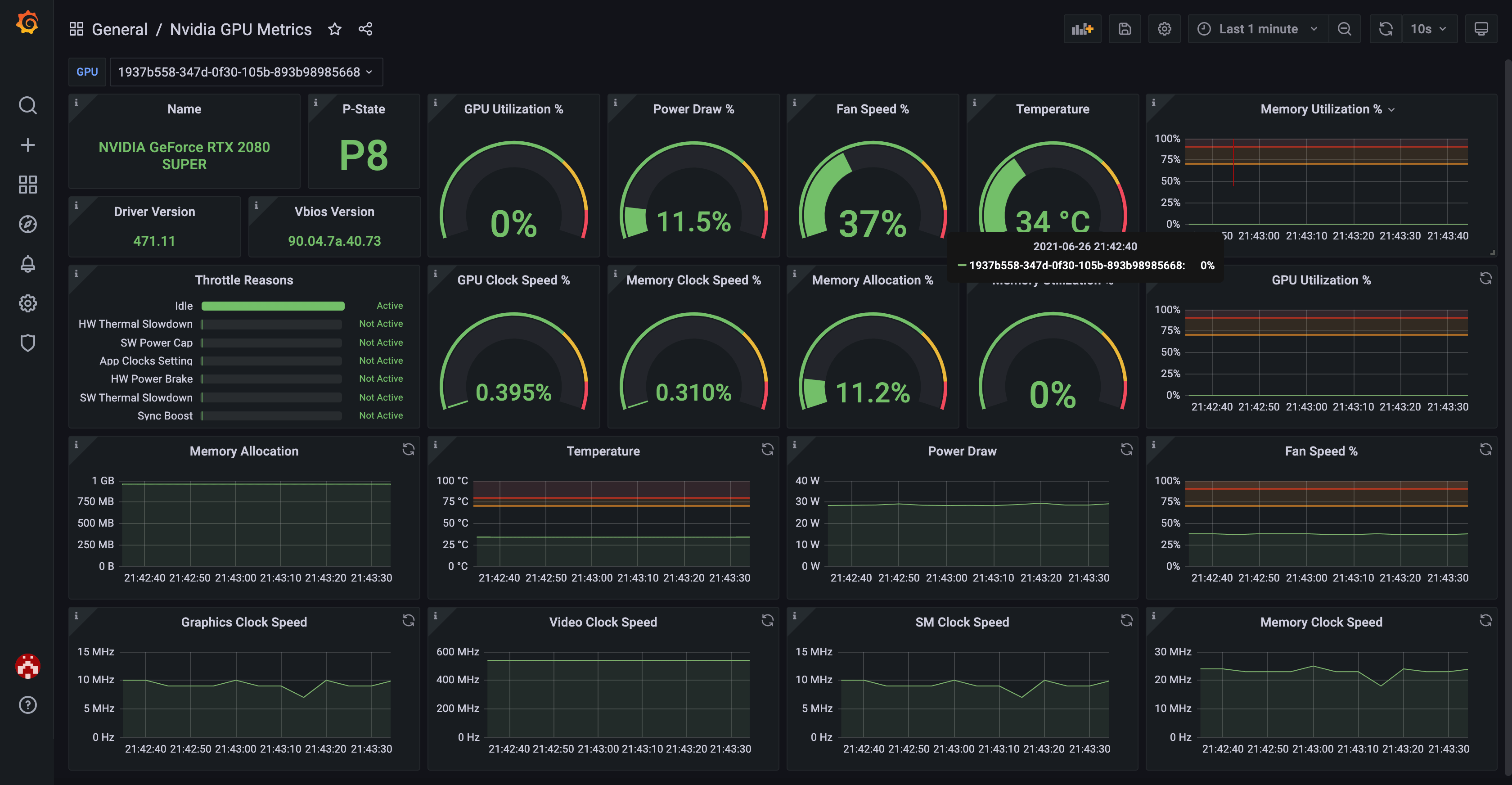
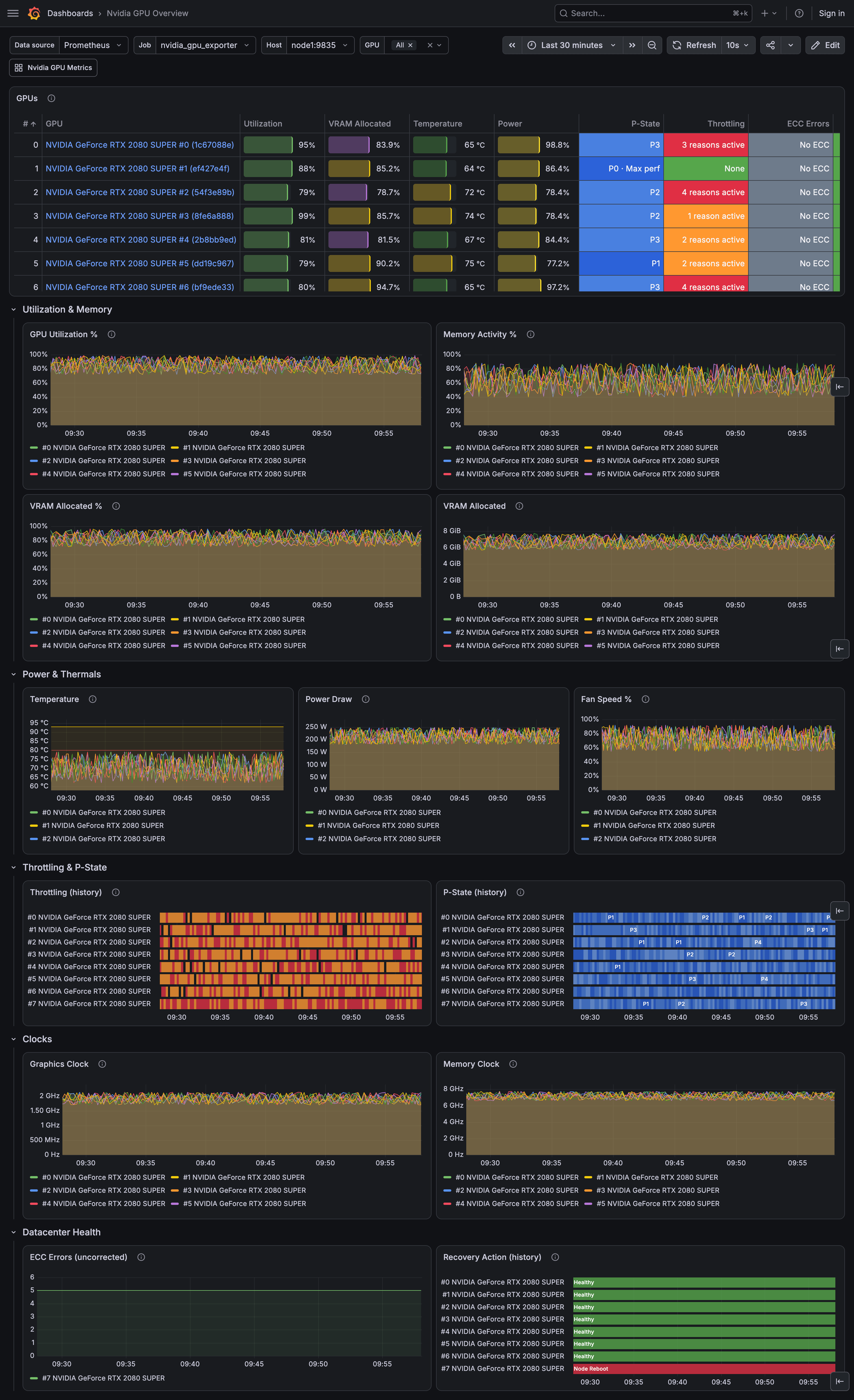
There are two official Grafana dashboards, and they link to each other in Grafana:
- Nvidia GPU Metrics (ID
14574), the per-GPU detail view. - Nvidia GPU Overview (ID
25547), which compares all GPUs of a node side by side and drills down into the detail dashboard.
Import either by ID in Grafana (Dashboards - New - Import), or enable grafanaDashboard in the Helm chart to get both provisioned automatically. The JSON is also in this repository under docs/grafana.
Here’s how they look:
Installation
INSTALL.md has the steps for every platform: Linux (deb/rpm packages or a plain binary, with a systemd unit), Docker, Kubernetes (the Helm chart), Windows (winget, Scoop, a native Windows service, or an all-in-one script that also sets up Prometheus and Grafana) and macOS.
The container images are on Docker Hub and GHCR, the Helm chart is on Artifact Hub, and the binaries and packages are on the releases page.
Verifying releases
Release artifacts are signed so you can check they came from this project’s release pipeline:
- The
checksums.txtfile attached to a release carries a keyless cosign signature bundle (checksums.txt.sigstore.json), which covers every binary, archive and package. Releases without that file have a GPG signature instead, see the install guide. - The container images and the Helm chart are signed keyless with cosign too, tied to the release workflow’s identity. The chart’s classic repository additionally carries GPG provenance files, since Helm verifies only those.
See INSTALL.md for the exact verification commands, and the chart README for the chart.
SECURITY_MODEL.md describes what you can expect from the exporter security-wise and where the trust boundaries are. SECURITY.md says how to report a problem.
Configuration
See CONFIGURE.md for details.
Metrics
See METRICS.md for details.
Contributing
See CONTRIBUTING.md for the process and the development setup, ROADMAP.md for what is planned and what is not, and GOVERNANCE.md for how decisions are made.
Contribute a GPU capture
The exporter parses nvidia-smi output, which differs across GPU models, driver versions and operating systems. The test corpus already covers a good range of hardware. A capture from a setup it has not seen yet, e.g., a new GPU model or a brand-new driver, is still a welcome contribution, and it takes one command:
./internal/captures/collect.sh # add --load for an under-load sample too
It needs only nvidia-smi, bash and the standard core utilities (awk, sed,…). It runs read-only and masks identifiers (GPU UUID, serial, hostname) by default.
It writes one .txt file. Commit it and open a PR, or attach it to an issue. See internal/captures/README.md.
[
](https://github.com/utkuozdemir/nvidia_gpu_exporter/stargazers)